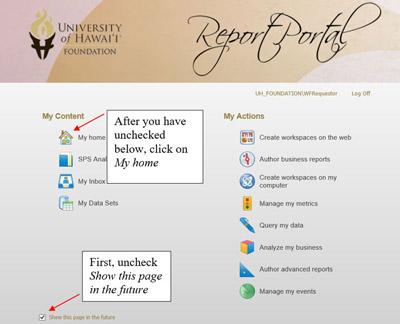
When you first login to ONESolution Reporting, it directs you to the splash page with links to variety of analytical and reporting tools. Many of the features on the splash page are not currently available. Since it requires several clicks to navigate to the list of reports, you can bypass this splash page when you login by setting the reports page as your default home page.
Use the instuctions bellow to set your home page to the repots page.
At first login, uncheck Show this page in the future, then click on My home.
Click on Client Specific folder:
(click on the report title and not the check box)

Then click on ONESolution Finance Reports folder

Then click on Cognos Reports folder

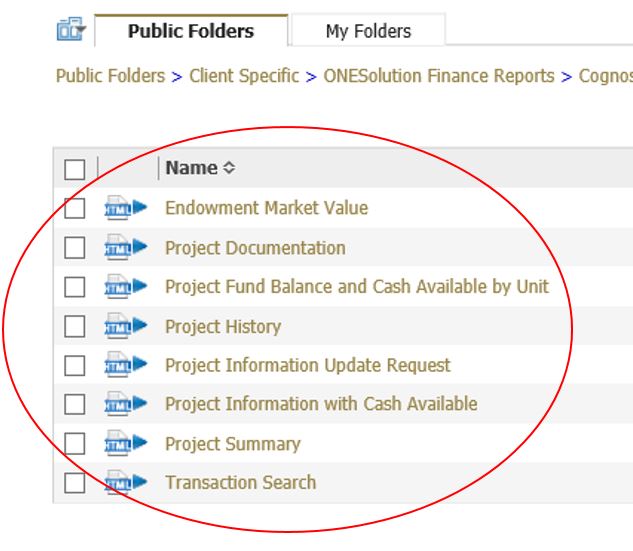
Then click on UH Account Administrators folder to view available reports

On the top right hand of the page, click on the down arrow next to the home icon, then click on the Set View as Home. At next login, you will be directed to the UH Account Administrators page displaying links to reports.

Most people will only have access to reports in the UH Account Administrators folder, however if you do need to navigate to other folders, use the folder links highlighted below.
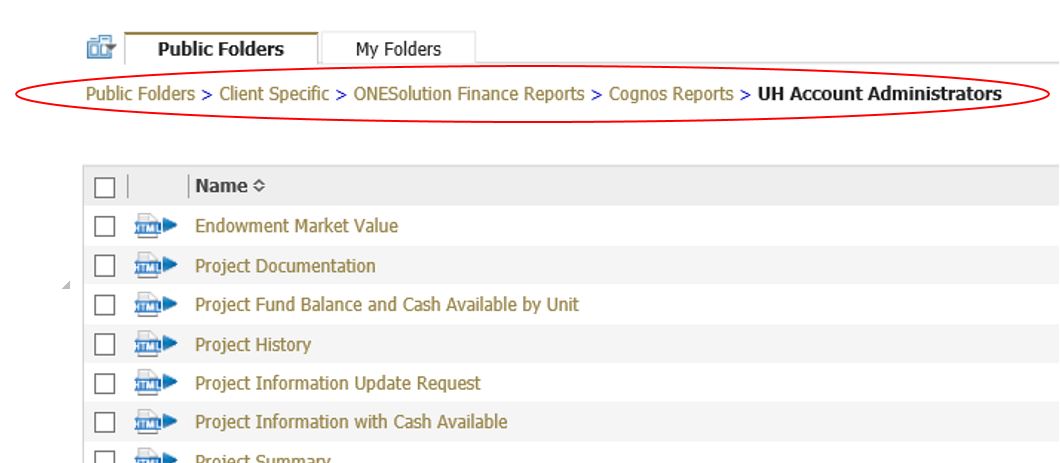
Simply, click on the report titles to run reports.